• Home
  • About Us
  • Toolkit
  • Archives
  • Advertise
  • Privacy Policy

Kids Ain't Cheap

But They Sure Are Worth It

  • Parenting
    • Baby Stuff
    • Books and Reading
      • Aesops Fables
      • Comic Books
    • Education
    • Family Time
    • Green Living
    • Growing Up
    • Healthy Living & Eating
    • Holidays
    • Parenting
    • Random Musings
    • Shopping
    • Stuff to Do
  • Money
  • Product Reviews
    • Books and Magazines
    • Discount Sites
    • Furniture
    • House Keeping
    • Reviews News
    • Toys and Games
  • Contact Us
  • Our Editorial Commitment
  • Search

3 Unexpected Options for Stay At Home Moms to Make Extra Money

October 3, 2019 | Leave a Comment

side hustles for moms

Perhaps you were a career girl before you had babies. Or you were a young mom and never had a chance to build a working network. Either way, you decided there was nothing more valuable than staying at home to raise your family. Admittedly, however, you’re a little bored or strapped for cash. If you’re wondering how you can make extra money as a stay-at-home, I’ve got three possibilities that aren’t the usual options you’ll find in your Pinterest search. Don’t expect to find blogging on this list.

Bookkeeping

If you think a degree is required to be a bookkeeper, think again. Bookkeeping is a learnable skill if you have an eye for detail. The bookkeeping field has started to change as software (Quickbooks and Xero) has emerged to make it simpler for the small business owner.

However, while the software lends a helping hand, many business owners don’t a) have the desire, b) have the time, and c) want more understanding of what they’re looking at. As a result, you’ll send the bookkeeping field start to shift to a flat fee work from home field, rather than a low paid hourly rate brick and mortar store. This provides you with the flexibility to work from home and stay in control of your schedule. Both essential requirements for stay-at-home moms.

I recommend investing in a course to learn the basics of bookkeeping, as well as learn how to build an online business and find clients. It can be pricey, but certainly not to the level of a semester of college. Bookkeeper Business Launch is a course you should consider. They’ve got a great support community and it’s an overall amazing program. I’ve personally taken it, and as a former CPA, I can recognize it’s value. I highly recommend it if you’re interested in exploring this as an opportunity to build your own business.

Sell Your Own Product

Have you ever dreamed of selling your own product? You can! You can sell anything from wine to supplements to shower curtains with your very own label, all from the comforts of home. This is done via the private label industry.

Private label is the process of working with a manufacturer to produce a product to sell based on your specifications. You add a label on it and sell it directly to the public. You’ll want to stick to basic items that sell well on platforms such as Amazon and eBay. They should be light in weight and not fragile to ensure they ship well.

Once you decide on your product, find a manufacturer. Alibaba is a great place to start. You’ll also want to design a logo, label, and packaging. Finally, you’ll need a platform to sell. Amazon FBA is a popular and simple option. Or you can go all-in and sell through your own website.

Rent Baby Gear

As a stay-at-home mom, you likely have some baby gear at your disposal. You can sell it on Craigslist or Facebook marketplace, but there’s another option you may not have heard of. While not exactly an option that will allow you to stay at home, and requires a bit more flexibility – you can bring your children along.

BabyQuip is a baby rental company set up very much like Uber and Lyft. You provide the baby gear, and they provide the website and marketing. A tourist visiting your town that isn’t interested in hauling a crib, a car seat, and toys on their vacation can go to the website and rent the gear. You deliver the gear based on the hours you’ve set and receive 80% of the rental fee plus a delivery charge.

There’s minimal risk with this business model as the customer pays their order upfront which you can use to purchase any items you don’t have. If and when you decide to quit renting, you can sell your inventory, possibly at break-even. I was a BabyQuip quality partner for a little over a year. During my busiest month, I netted a $700 profit with minimal time investment.

P.s. if you are reading this because you want to find a way for your children to make money, consider reading 49 Easy Ways For Kids To Make Money over at CompoundingPennies.

Have you tried any of these side hustles to make extra money? How did you like it? Let us know in the comments below.

Read more:

7 of the Best Ways to Make Money on the Side With a Full Time Job

How A Side Hustle Can Save Your Family’s Budget

Get Some Extra Cash: 9 of the Best Ways to Make Money From Home

Kate Fox

Kate Fox is a former CPA, with twenty years of experience in public accounting and corporate finance. Born and raised in Alaska, Kate is currently based out of southeastern North Carolina.  She loves coaching others on personal finance and spends her free time traveling with her family or relaxing by the pool with a good book, probably about money.

Filed Under: Household, Money and Finances Tagged With: how to make extra money, make money online, Stay At Home Mom

My Paribus Review: Is Paribus Receipt Fetcher the Next Money-Maker for Your Family?

March 6, 2017 | Leave a Comment

Paribus reviewAccording to a Pew Research Center survey, 79 percent of Americans made online purchases in 2016. Fifty-one percent purchased something on their cell phones. Parents make up a massive percentage of those shoppers, so that’s why I’ve put together this Paribus review. It’s here to help you find ways to earn cash back on those online purchases this year.

My Paribus Review: Is Paribus Right for Your Family?

If you’re handy with your smartphone, you probably already use money-saving apps like RetailMeNot, Swagbucks, or Walmart’s Savings Catcher, but there’s a new kid in town called Paribus, and it’s different than any other app you’ve tried.

What Is Paribus?

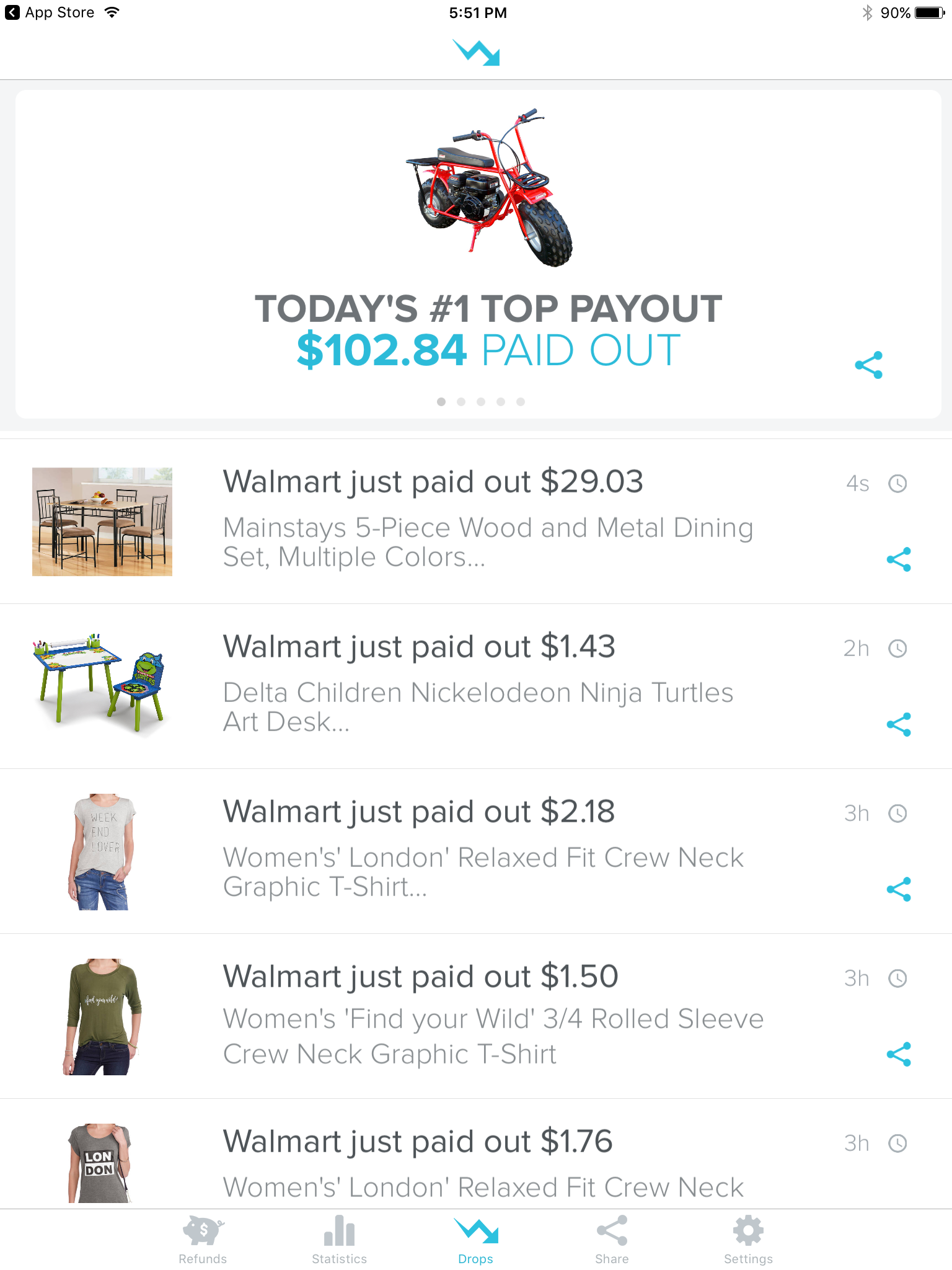
Paribus is an app available to all Apple devices and is free to download. Every time you shop online, Paribus automatically scans your digital receipt to see if there are purchases eligible for cash back over the subsequent weeks.

For example, let’s say you bought your son a $60 LEGO kit at Walmart.com for his birthday last week, but you’ve just noticed the price dropped to $40! Paribus automatically contacts Walmart to find out if you can get that $20 refunded. If they agree, then you get 100% of that refund!

Not bad for doing basically nothing, right?

What Are the Benefits and Drawbacks to Using Paribus?

It goes with the territory that every new product has its pros and cons. Your days are filled with tending to kids, running your household, and keeping your head on straight. My job is to help you make an informed decision about products that may or may not benefit your family as honestly as I can.

Therefore, here are the benefits and drawbacks I observed when using Paribus.

BENEFITS

It’s free. From the moment you download the app to your first cash back alert, there are no charges or hidden fees. Although, you do have to spend money shopping online, obviously! 

It could be great for the holidays. Last Christmas, I asked a group of moms to share their favorite way to go Christmas shopping and the majority answered, “Online.” If you rack up most of your holiday spending money with online retailers then you could be in for some cash back on some of those purchases.

DRAWBACKS

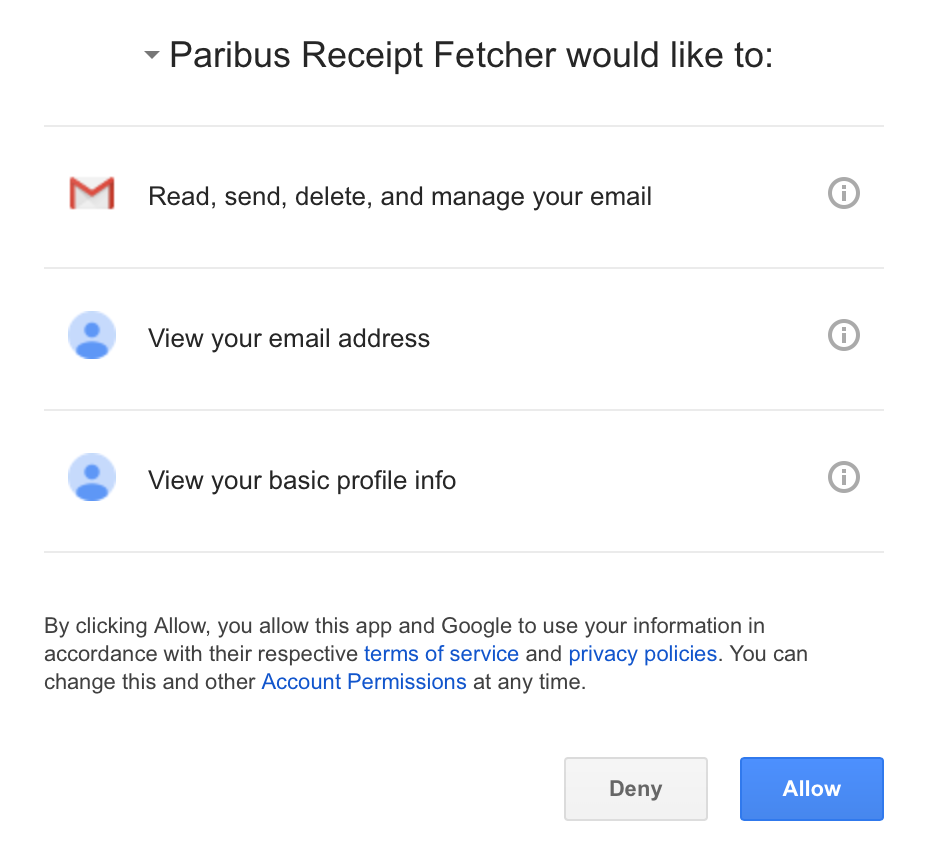
You have to share quite a bit of private information with Paribus. Like I said earlier, I want to be totally honest in this review, so I need to share one drawback that gave me considerate pause at first. Paribus will have authority to read, send, delete, and manage your email. They also request your Amazon login and password, as well as your credit card information.

I worked for years in fraud prevention at a financial institution, so those were automatic red flags to me. I dug in and researched user experiences since the app’s inception in 2014. Despite the scary amount of personal information, I did not read one report of fraudulent activity or compromised information from users.

IMG_0231 (2)

I’m just reviewing this product as a consumer and don’t have authority to ensure this software is secure, but you can hear directly from Paribus and learn more details about how they handle our information via this CNBC report.

Watch out for hiccups. I experienced a technical bug when I tried to sync my Amazon account with Paribus. Upon further research, I discovered several other complaints about technical hiccups like that. I’m sure they’re updating and ironing out bumps all the time, but just be aware that those may cause some delays.

Not every purchase or store is eligible. A number of users complained that Paribus only pays back on eligible stores and purchases, so their cash back wasn’t as much as they hoped. Considering your family’s needs over the course of this year, you may want to evaluate where you’ll be shopping for them and how often. Paribus updates the list of eligible retailers regularly.

Paribus Review – Final ThoughtsIMG_0235

The million dollar question is this: Did I actually get cash back using Paribus? 

Not yet. I believe the reason is because I shop infrequently online and have only just started using Paribus.

Paribus is a free app that requires minimal upkeep, so if your alright with the parameters discussed throughout this article and you already shop online regularly, then it’s likely this app will make you some money. If you don’t shop a lot until Christmas, then it may still be helpful. If you just don’t shop a lot, ever, then you may not hear much chatter from Paribus.

Are money-saving apps like Paribus a wise replacement for good financial habits? Not at all. We use terms like “personal finance” and “financial living” because you must live out certain principles in order to succeed. Laying a foundation with things like budgeting, saving, and spending less than you make are far and away more important than using the right gadget or app. Are apps still helpful? Yes. But don’t let them tempt you to spend more than you intended to and wreck your foundation.

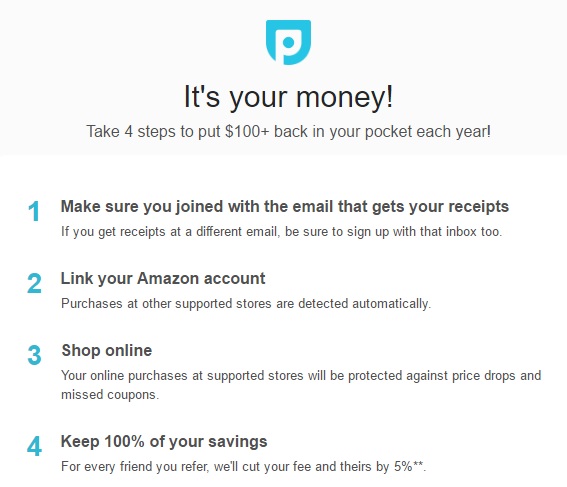
The Sign-Up Process

The following four steps taken directly from Paribus’ sign-up page will help you get started:

Paribus I

In other words:

  • Download the app.
  • Sync your info to Paribus.
  • Shop.
  • Get paid.

Where are some of your favorite online stores when you’re shopping for your family? Share one below!

This post was sponsored by Paribus. 

P.S. Are you a stay-at-home mom? Make sure you bookmark or pin some of these resources for later!

  • 10 Steps to a Successful Stay-at-Home Mom Budget
  • How to Afford Your Dream of Becoming a Stay-at-Home Mom
  • 14 Online Jobs for Stay-at-Home Moms (That Are Worth Your Time)
  • 13 Ways for Stay-at-Home Moms to Save Money
  • Loans for Stay-at-Home Moms – What Are YOUR Options?
  • The SAHM Budget Test: How to Afford to Be a Stay-at-Home Mom

Filed Under: Discount Sites, Money and Finances, Product Reviews for Parents, Shopping Tagged With: make money online, online shopping, paribus review, save money online, shopping for your family

  • Facebook
  • Pinterest
  • RSS
  • Twitter

Basic Principles Of Good Parenting

Here some basic principles for good parenting:

  1. What You Do Matters: Your kids are watching you. So, be purposeful about what you want to accomplish.
  2. You Can’t be Too Loving: Don’t replace love with material possessions, lowered expectations or leniency.
  3. Be Involved Your Kids Life: Arrange your priorities to focus on what your kid’s needs. Be there mentally and physically.
  4. Adapt Your Parenting: Children grow quickly, so keep pace with your child’s development.
  5. Establish and Set Rules: The rules you set for children will establish the rules they set for themselves later.  Avoid harsh discipline and be consistent.
  6. Explain Your Decisions: What is obvious to you may not be evident to your child. They don’t have the experience you do.
  7. Be Respectful To Your Child: How you treat your child is how they will treat others.  Be polite, respectful and make an effort to pay attention.
Best Parenting Blogs

Most Popular

Baby

9 Baby Names That Sound Expensive Even Though Naming Your Baby Is Still Free

Evan Morgan
Baby

The Rise of “Aggressive” Baby Names Is Raising Eyebrows — Here’s What Parents Are Choosing

Evan Morgan
Baby names

Teachers Admit: These 6 Baby Names Create Instant Bias in the Classroom

Latrice Perez
6 Baby Names That Sound Cute Now but Cause Problems Later

6 Baby Names That Sound Cute Now but Cause Problems Later

Brandon Marcus
11 Ways Kids Are Outsmarting Parental Controls 1. Using Alternate Devices One common trick is simply turning to another device. If a child’s main phone or tablet is restricted, they may borrow a sibling’s, friend’s, or even a school laptop. This instantly gives them access to content outside of parental oversight. Parents often focus on one device, forgetting that others in the household can serve as loopholes. Knowing this tactic helps families tighten controls across all electronics. 2. Clearing Browsing Histories Many kids quickly learn that clearing browsing history hides evidence of restricted activity. With just a few clicks, they can erase any trace of websites visited. This makes it harder for parents to notice when rules are being broken. Parents may assume no history means no browsing, but the reality is often the opposite. Kids are outsmarting parental controls by making it seem like nothing happened at all. 3. Using Private Browsing Modes Most browsers offer “incognito” or private browsing features. Kids use this mode to access websites without leaving a record in the history. To parents checking later, everything looks clean and safe. This simple trick is often one of the first ways kids discover how to bypass restrictions. Conversations about private browsing can help close this gap. 4. Guessing or Resetting Passwords Children who are persistent may try to guess passwords to parental control apps or accounts. Others may find ways to reset them through email prompts or security questions. Once inside, they can disable restrictions entirely. Parents may not even realize controls have been altered until much later. Stronger, less predictable passwords can make this more difficult. 5. Using VPNs to Hide Activity Virtual private networks, or VPNs, let kids disguise their online locations. With one downloaded app, they can bypass geographic or parental restrictions. Some children learn about VPNs through friends or even social media. This makes it easy for them to reach content that should be blocked. Parents often underestimate just how simple it is for kids to use these tools. 6. Creating Fake Accounts When parents monitor social media, kids may create hidden accounts. These “finstas” or fake profiles allow them to interact freely without parental oversight. While their main account appears harmless, the secondary one tells a different story. Kids are outsmarting parental controls by playing both sides at once. Checking for duplicate accounts can help parents stay more aware. 7. Exploiting Time Zone Settings Some kids change the time zone on their devices to bypass screen time limits. This trick allows them to gain extra hours of usage undetected. Parents may assume controls are working, but in reality, the child is bending the clock. It’s a clever loophole that highlights just how resourceful kids can be. Monitoring device settings regularly can catch this tactic. 8. Disabling or Uninstalling Apps Parental control apps can be deleted or disabled with surprising ease. Some kids even reinstall them before a parent checks, making it seem like nothing changed. Others may simply restrict permissions to prevent apps from functioning properly. When apps aren’t monitored closely, parents may not notice they’ve been tampered with. This shows the importance of consistent follow-up. 9. Turning to Friends for Access If a child can’t get past restrictions on their own, they may rely on friends. Visiting a friend’s house or borrowing their phone can give them a free pass. Parents often forget that peer environments can override restrictions set at home. This kind of social workaround is especially common with gaming or social media. Open conversations about trust and responsibility are essential. 10. Hiding Apps in Plain Sight Kids sometimes download apps that look innocent but serve as gateways to hidden activity. These apps may disguise themselves as calculators or utilities. In reality, they allow file storage, private messaging, or browser access. Parents glancing at a home screen may overlook them entirely. Learning to recognize these disguised apps can help parents stay informed. 11. Outpacing Parents’ Tech Knowledge Finally, kids often know more about devices than their parents do. Whether through YouTube tutorials, TikTok hacks, or peer groups, they quickly learn advanced workarounds. This knowledge gap means controls can be bypassed before parents even realize the loophole exists. Staying informed and continually learning about new technology is the best defense. Kids are outsmarting parental controls because they adapt faster than most adults. The Real Solution Lies Beyond Restrictions While controls and filters are important, no system is perfect. Kids will always find creative ways around barriers, making communication the strongest safeguard. Setting clear expectations, building trust, and having ongoing conversations about online behavior matter more than apps alone. Parents who combine technology with open dialogue create a safer digital environment. The goal isn’t to win a battle of wits but to build a relationship that keeps kids both safe and honest. Do you think kids are outsmarting parental controls faster than parents can keep up? Share your experiences in the comments below. What to Read Next... 6 Parenting Tech Shortcuts That Can Expose Your Child to Strangers How Much Screen Time Is Too Much—Legally Speaking? Is Your Child’s School Quietly Tracking Their Location Without Your Consent? How Much Screen Time Is Quietly Reshaping Childhood Behavior? Why Some Parents Are Being Investigated Over Homeschooling Records

11 Ways Kids Are Outsmarting Parental Controls

Catherine Reed

All content on Kids Ain’t Cheap is for entertainment purposes only. By reading this blog, you agree that Kids Ain’t Cheap is not responsible for any actions taken after reading this blog. For the full disclaimer, see our privacy policy.

Please note that Kids Ain’t Cheap has financial relationships with some of the merchants mentioned here. Kids Ain’t Cheap is funded by banner advertising, commission sales and search optimization consulting.

Copyright © 2006–2026 | District Media | All Rights Reserved | Privacy Policy

Copyright © 2026 Runway Pro Theme by Viva la Violette